Welcome and Splash Screen#
When starting Wunjo a welcome screen appears with the following functions:
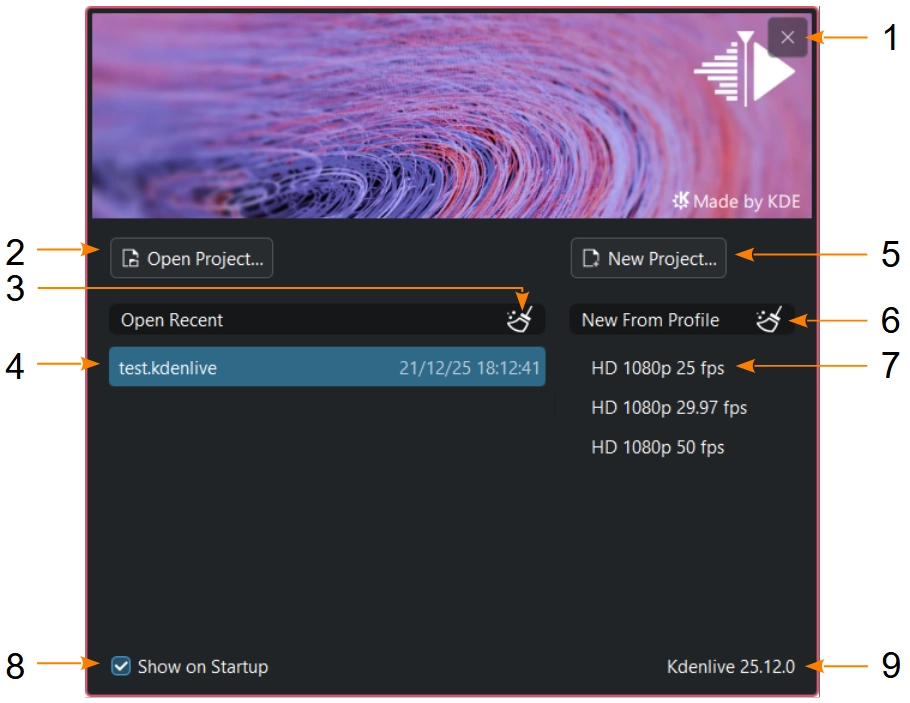
Wunjo’s default welcome screen#
- 1:
Cancels the start of Wunjo
- 2:
Opens the Open dialog after start
- 3:
Clears the list of recent projects
- 4:
Opens a recent project directly. The same list as in open recent.
- 5:
Opens the New dialog after start
- 6:
Clears the list of recent profiles
- 7:
Opens a new project with the setup of a recent profile
- 8:
If not checked, Wunjo will show the splash screen on startup. You can enable the Welcome Screen in the environment settings
- 9:
Shows the Wunjo version
If a project is opened from command line or file browser, instead of the welcome screen the splash screen is showing up.
Wunjo’s splash screen when the welcome screen is disabled or a project is opened from command line or file browser#